
Social commerce: How willing are consumers to buy through social media?

With social networks increasingly looking at social commerce, giving consumers the opportunity to buy direct from brands, marketers need to understand how to convert today’s browsers into tomorrow’s buyers.

trends for web 24.03.16

Social networks are becoming the new online marketplaces with new research showing why shoppers are looking to Facebook, Instagram and Twitter for their next online purchase.

But not all brands are convinced of social’s value as a sales channel. Morrisons’ marketing director Andy Atkinson last week said brands using social to sell were “making a mistake”. As social media sites continue to enable direct purchasing the opportunities for brands to sell direct via these channels are opening up. In October last year Facebook announced further developments to the site’s dedicated shopping section – which allows visitors to buy items on the platform instead of being redirected to a retailer’s site – to improve the mobile shopping experience.

Facebook-owned Instagram also made changes to its platform last year by opening up the site to all advertisers with newer direct response ad formats that encourage users to take actions on posts through buttons such as ‘shop now’, ‘install’ or ‘learn more’. Meanwhile, Snapchat confirmed it is planning to roll out its own ecommerce platform and Twitter has previously tested a ‘buy’ button on its feed.

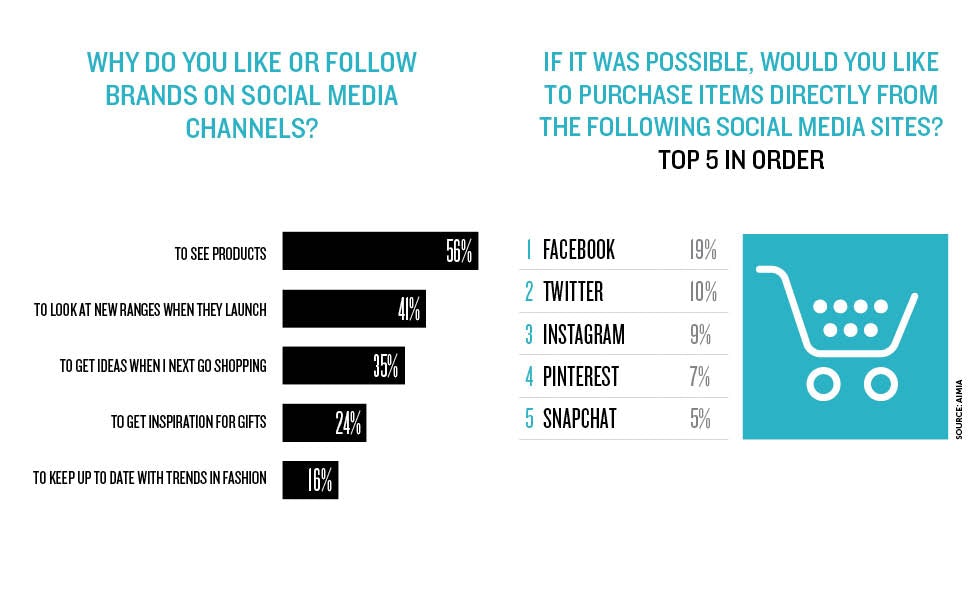
However, many brands are yet to enable this type of shopping. Although consumers are not yet able to buy all products directly through social media channels, they are already using brands’ social pages for inspiration to buy, which should act as an indicator of the potential value of social commerce. More than half (56%) of consumers who follow brands on social media sites say they do so to view products, according to new research from loyalty analytics company Aimia, which owns the Nectar loyalty brand.

Dubbed ‘social shoppers’, the research shows that these individuals visit social networks as part of their everyday shopping behaviour and use images they see on social media sites to inspire purchases.

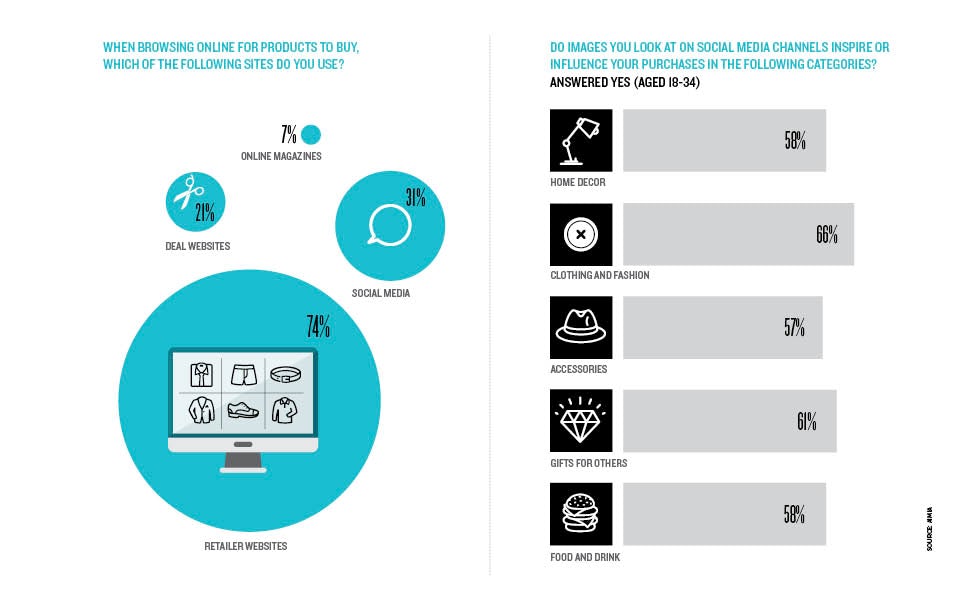
Nearly a third of online shoppers (31%) say they are using these channels to browse for new items to buy. Facebook is the most popular network people are using (26%), followed by Instagram (8%) and Pinterest (6%).

Jan-Pieter Lips, president of international coalitions at Aimia, says: “If fully implemented, shopping on social media could become a primary shopping channel. However, many consumers defer to major ecommerce sites such as Amazon when making purchases. Brands need to think about social media sales strategies and how they form part of their wider ecommerce functions.”

The research, which surveyed 2,017 people aged 18 and over, also shows that 41% follow brands to look at new ranges when they launch and 35% do so to get ideas about what to buy when they next go shopping. These reasons rank slightly higher for 18- to 24-year-olds at 47% and 40%, respectively.

Almost a quarter (24%) of all respondents follow brands to get inspiration for gift ideas and 16% to keep up-to-date with trends and what is fashionable.
trends for web 24.03.162

Looking for inspiration

The research also breaks down what inspires different age groups. Among 18- to 34-year-olds who use social media to browse for new products, the top five purchases inspired by images on social networks are clothing and fashion (66%), gifts (61%), home decor (58%), food and drink (58%) and accessories (57%).

For those aged 55 and over the most popular items are gifts (36%), technology (33%), food and drink (31%), clothing and fashion (28%) and holiday destinations (26%).

“Social commerce offers a real opportunity for retailers to shorten the path to purchase for customers,” adds Lips. “As it stands, social media platforms are acting as a sort of catalogue, but many customers still go elsewhere to purchase the product.”

Lips warns that if brands do not prioritise social channels, there is the risk that they will “miss out on a vital opportunity to engage with a captive audience of customers and convert browsing into sales”.

The research also shows that Facebook is the most popular site for direct purchasing, with 19% of all respondents selecting the platform, followed by Twitter (10%). Next are those wanting to be able to buy from Instagram (9%), Pinterest (7%) and Snapchat (5%).

“It’s the younger demographic that are driving the social shopping trend,” says Lips. “Brands need to keep up with this demand if they are going to make the most of the future generations of shoppers.”

The stats show that one-third (33%) of 18- to 24-year-olds say they would like to purchase items directly from Facebook, 27% want to shop on Instagram and 20% on Twitter, followed by Pinterest (17%) and Snapchat (15%).

Facebook is also popular for 30% of 25- to 34-year-olds and 23% of those aged 35 to 44. But only 10% of 54- to 65-year-olds say they would like to purchase items directly from Facebook, which brands should take into account when considering the social shopping route to sales.

Find out how to measure the value of social media at MWL on 27-28 April. To register for tickets click here.

How to Use Polyvore to Drive Traffic and Sales for Your Online Store

How to Use Polyvore to Drive Traffic and Sales for Your Online Store

If you thought you had all your social commerce bases covered, you might be in for a surprise.

Launched in 2007, Polyvore has gradually emerged as one of the most effective social platforms for ecommerce sites to drive high-value traffic and sales from.

Focusing on fashion and home décor, the community powered social network allows you to create collections and collages called “sets”. These sets can be made up of products from online stores around the web – including your own.

Products can be mixed and matched using Polyvore’s visual set creation tool to create elaborate or simple designs, with each product presenting pricing, details and origin when hovered over.

How to Use Polyvore to Drive Traffic and Sales for Your Online Store

The aim for fashion lovers and shoppers is to find new styles and trends in action from different brands across the world, and perhaps discover a bargain or two in the process.

Polyvore’s numbers are also worth noting. The platform is home to over 80 million shoppable products, with users creating 4 million new sets every month.

In other words, it’s an engaged community of curators and shoppers and source of traffic and sales you can no longer afford to ignore.

The Polyvore Factor

Alongside social networks like Facebook and Twitter, Polyvore is becoming something of a social commerce powerhouse in its own right – particularly when it comes to order values.

Polyvore recently raised a few eyebrows in our social commerce infographic, which uncovered which social media platforms drive the most sales.

With an impressive average order value of $66.75, Polyvore trumped every other social platform in the study, including Instagram, Pinterest and Facebook. Despite all of those networks being supremely popular, it seems that none of them quite have the Polyvore factor.

The Polyvore Factor

So, with Polyvore proving its value (quite literally) over its social networking rivals, ecommerce merchants everywhere owe it to themselves to pay it some more attention.

Getting Started with Polyvore

If your store isn’t already represented on Polyvore, your first step towards more social commerce success is to become a member and then cover the basics.

Signing up

Thankfully, this part is a piece of cake.

To sign up, simply head over to the Polyvore homepage, and select your sign up preference. You can sign up via Facebook, Twitter or an email address if you like to keep things separate.

Signing up

The sign up process also gives you the option to change your username and find friends on Polyvore via Facebook and Twitter.

Branding

Just like on any other social network, Polyvore can be used by your brand as a direct marketing arm.

Polyvore gives you the option to display your brand logo as an avatar, and also enables you to include a link to your store from your profile page.

Branding

Both of these options, along with other settings, can be found by clicking the “Edit Profile” button your Polyvore profile page.

Adding your Products

In order to start showcasing your wares, you’ll need to add your products to your Polyvore profile.

To do this, a simple browser bookmark called “Clipper” needs to be installed.

Adding your Products

The bookmark can be installed via the Polyvore Clipper page, by simply dragging and dropping the link provided on to your browser toolbar.

After installing Clipper to your toolbar, you’re all ready to start adding products from your store.

Simply head over to one of your product pages, and click the Clipper toolbar button – similar to how you would pin something to Pinterest.

Adding your Products

Polyvore then does the hard work automatically, by presenting you with a window which houses all the product images found on your product page, along with the product name and price.

All you need to do is select the images you want, add some tags, and then hit “Like”. The product in question will then be saved to your profile, ready to be seen by shoppers and used in sets.

Creating Sets

Here’s where you can exercise some creativity.

Sets are collages which you can create within the Polyvore platform. You can use products from your store, products from other users, products you find around the Internet, or even a mixture of all three.

Creating Sets

By clicking the “Create” button on the Polyvore menu, you can get straight into the surprisingly fun visual editor.

Using the editor, you can drag-and-drop default images, products from around Polyvore and most importantly, your very own imported products.

Images can be resized, rotated, magnified and more, enabling you to seriously flex your creative muscles in order to present your products beautifully.

The end is a collage which can represent living spaces, mixed and matched digital displays, and far more.

Creating Sets

Users who come across your set can then hover over items within the collage which catch their eye, leading them right back to your store.

How to Use Polyvore to Drive Sales

According to our social commerce infographic, on top of having an exceedingly high average order value, Polyvore also boasts a conversion rate of 0.58%, which is a shade better than Pinterest, LinkedIn and Reddit.

So, once you’ve got your brand set up on Polyvore, it’s time to start driving those sales. Here’s how to do it.

Get Creative With Sets

Your sets can be as imaginative or as bland as you want them to be. Many brands on Polyvore opt for the cliché product image, with their item floating on a white background.

That kind of presentation is expected by shoppers when they visit your website – but not when they visit your Polyvore account.

Instead, try incorporating some additional items, products and maybe even some text in order to spruce up your sets. Give your products some context, and don’t be afraid to show a little spontaneity.

Get Creative With Sets

Fashion accessory vendors MonaMoore present a good example of a well crafted Polyvore set.

Their “Haider Stole My Heart” set is made up of a number of different products, “props” and even some text. It’s busy and interesting, but not complicated.

Start Sharing

There are some extensive sharing options built in to the Polyvore platform which you should take advantage of.

On top of standard sharing buttons for networks like Facebook, Twitter and Pinterest, Polyvore allows you to embed sets directly into your blog or website.

Start Sharing

By clicking the “Blog” share button found above all Polyvore sets, you can choose from four different embeddable layouts and the products you wish to share.

The embed code found within the same window is automatically adjusted depending on your selections, and the final step is as simple as copying and pasting that code into your website.

Start Sharing

A good example of intelligently embedded sets can be found on The Glitter Guide, a fashion blog that consistently embeds Polyvore sets into their posts very effectively.

Participate in Groups

Polyvore gives you the option to search, set up and join different groups.

With over 21,000 of groups, your brand is bound to fit into a few. You can apply to join as many groups as you like, and with each acceptance, you should make a point of engaging with existing content and members in order to draw attention back to what your store has to offer.

Participate in Groups

PersunMall for example run and participate in a number of Polyvore groups. Their “Charming Sets for PersunMall” group rolls engagement and promotion into one, as they invite members to create sets using the PersunMall logo.

Run Polyvore Contests & Giveaways

Once you hit 30 followers on Polyvore, you can begin creating your very own groups. Once you have a group running, you can then use it to run contests for your members.

Run Polyvore Contests & Giveaways

Last year, ZeroUV ran a Polyvore contest to kick off the start of the school year, inviting participants to create their ideal outfit for their first class of the semester.

The Usual Social Etiquette Still Applies

In many ways, Polyvore is just like any other social networking platform. That means that the usual social media etiquette and marketing strategies apply.

This includes following and engaging with other Polyvore users by liking and commenting on their sets and collections, as well as responding politely to any comments you may receive on your own profile.

In other words, don’t just throw your products up and expect a response. The Polyvore community is expansive and evidently ready to spend – all you need to do is put the effort in.

Do you currently market your business on Polyvore? Let us know in the comments.

P.S. To be featured in Shopify’s Polyvore sets and collections, follow us on Polyvore here.


About the Author: Mark Macdonald is the Content Manager at Shopify. Get more from Mark on Twitter and Google+.