Then and Now: The Evolution and Growth of Digital Marketing

After more than 10 years in the industry we’ve seen the growth of digital marketing first-hand and there’s really only one thing we can say for certain: if you don’t keep up you’ll get left behind. 

Digital Evolution: How the Internet Changed Marketing


Digital Evolution: A Quick Look Back

With the advent of Gutenberg’s printing press in Europe in 1450, the ability to mass-communicate and sell gained such epic momentum that it’s barely slowed down in over 500 years.  Magazines first emerged in the 1730s, radio advertising in 1922 and then in 1941, the world’s first TV ad was broadcast on American screens in one of the most groundbreaking moments in marketing history.

Invention of the Internet | MediaVision[Tweet this]


Getting Connected

In 1965, a computer in Massachusetts connected with another in California via dial-up and in 1973 the first hand-held mobile phone call was made. But it wasn’t until the early 1980s when the first commercially available desktop PCs started filtering into homes, that a tidal wave of new marketing possibilities crashed onto the scene with digital. That was around 34 years ago.

Proctor & Gamble Domain Facts[Tweet this]


Blink and You’ve Missed It

You’ve got to be fast in this industry. Digital evolution happens so rapidly that the operating system used to write this article will probably be obsolete by the time the last sentence is written.

By The Time Our Agency Launched In 2004:

  • Queen Elizabeth had already sent her first royal email
  • PhotoShop 6.0 had been released
  • Ridley Scott had long since directed and screened the first ever Apple Mac ad
  • The first major spamming incidents by marketers had come and gone
  • The World Wide Web was already 15-years old
  • Everyone was talking about a thing called Facebook
  • Businesses were already using AdWords to generate traffic
  • SEO was a major buzzword


Digital Marketing Then & Now: Since 2004

Google Got Smarter

Early search engines like Yahoo!, InfoSeek, AltaVista, Lycos and WebCrawler made significant strides in the digital evolution of search but let’s be honest, the golden years didn’t start until Google launched in 1998. With the birth of today’s most popular search engine and its development of tools like AdWords in 2000 and content targeting services in 2003, everything changed online. In 2004, search engines started using advanced ranking algorithms and browsing online became more personal. The impact this had on business is immense. Being able to target browsers and develop strategies based on search patterns led to a whole new way of selling and communicating. These days a Googlebot crawls and indexes trillions of pages on the web and makes the most relevant ones instantly accessible via traditional or voice search. A brand can reach anyone, anywhere at any time, and that’s powerful.

SEO Grew Up

Optimising sites for search engines began to mainstream in the mid-90s and by 2004, SEO had become an essential marketing tool used on a global scale. In the early days, techniques like keyword stuffing, article submissions and link spamming were recommended by guys who mostly just didn’t know better. No one cared about the impact of social media and usability didn’t even come up in conversation – SEO was an island and keywords were embarrassing. But you learn. These days SEO is less of a loner and more of an essential cog in a greater machine powered by other strategies and channels.

SEO and Integrated Marketing[Tweet this]


Digital PR Became Incredibly Powerful

Back in the day there was no such thing as a traditional or a digital PR agency. There were only PR agencies. Today all that’s changed, and since the digital evolution PR has had to broaden its focus. A long time ago traditional PRs would use media tours to do press meetings and secure exposure for their clients in print, radio and on TV, often sending out reports and questionnaires afterwards to gather info from the contacts and to find out whether they’d even be featuring their clients. Today a digital PR specialist can find out everything they need to know about a contact before even making a pitch. By working with SEO reserach and trends, Digital PRs are able to back all of their decisions with data, leading to better targeting and more quantifiable results.

Social Media Kept Us Connected

In 2004 people still used MySpace. Little did anyone know at the time that Mark Zuckerberg and his Harvard roommates would release a colossal giant to crush all that came before. It was the start of a new era for digital marketing.  Social media stopped being a way to just chat with friends and started becoming a way to connect with brands, complain, spread news, shop and even influence other shoppers. Businesses took notice and online reputation management became more important than ever. Today, with channels like Twitter, YouTube, Instagram and Pinterest, with billions of users, targeted advertising and a digital landscape that never sleeps, social media has become one of the most vital parts of any marketing strategy.

Hashtag added to the dictionary[Tweet this]


Marketing Became Less Aggressive

For the longest time marketers used tactics designed to interrupt potential clients, contacted us without permission and blindly targeted everyone in the hopes of reaching someone interested. In short, communicating with potential customers hasn’t always been as sophisticated as it is today. Fortunately, thanks to better research, statistics and higher quality content and targeting, a new way of digital marketing began to find its stride. HubSpot co-founder and CEO Brian Halligan was credited with creating the term, inbound marketing, and later author Seth Godin took it a step further by introducing the idea of permission marketing. Today’s content marketing is based on all these principles: understanding the consumer better so you can appeal to their interests and needs with tailor made content and information. These days, we know we have to earn attention with great content, conversations, transparency, opt-in email lists, word-of-mouth brand building and viral marketing. And that’s just one of the ways the internet changed marketing.

The internet makes consumers smarter[Tweet this]


Don’t Get Left Behind!

Make sure your brand keeps up – speak to us about an integrated digital marketing plan and stay on top of your game.


 

The Pixelz Product Image Report: What 7 Million Edited Images Can Teach You [Infographic]

Main Image
Have ever wanted to know what most product images actually look like? Been curious to know if there’s something like an industry standard?
Well, we have. We wondered. And then, because we have data from over twenty thousand customers and seven million edited product images, we decided to find the answers and share them with you.

Here’s What We Learned

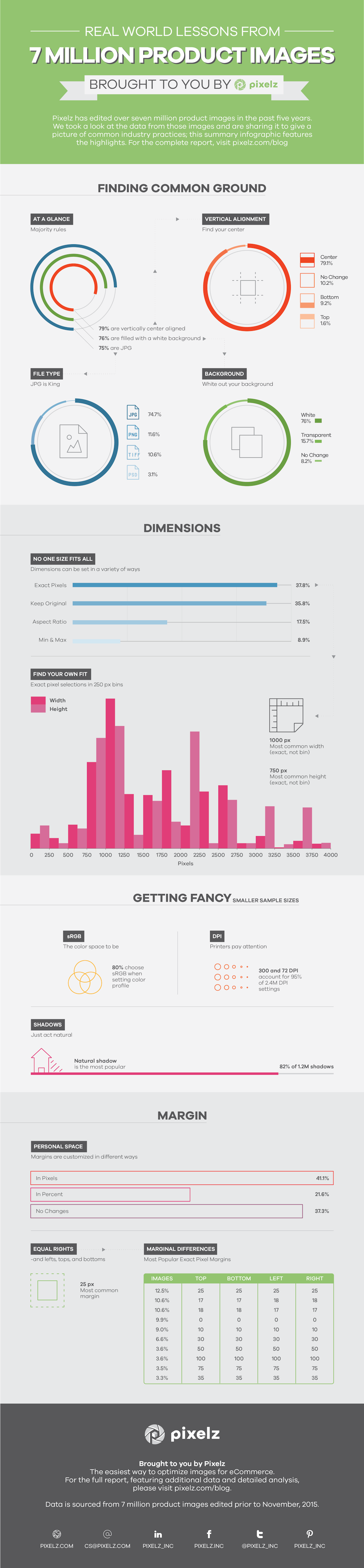
We’ve prepared the highlights in a handy infographic. For more detailed analysis, including “what does it mean for me?” interpretation, keep on reading afterwards.

Product image infographic showing industry standards and best practices for background, alignment, filetype, dimensions, and more

What Does That Actually Look Like?

Every image has a file type, size, margin, and background. After looking at the images we have data for, we found:

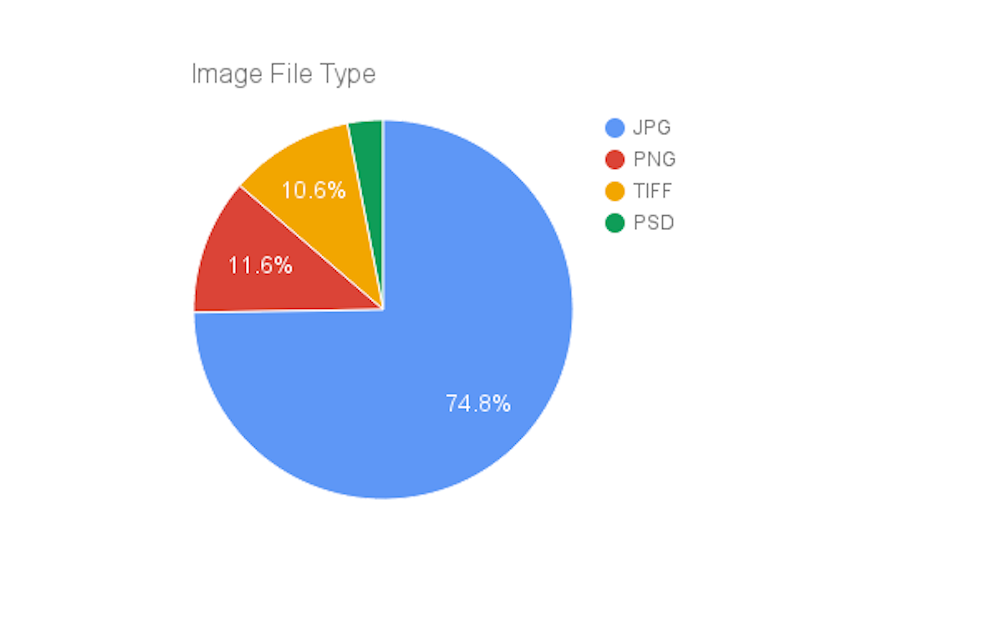
  • 75% of outputted images are JPG
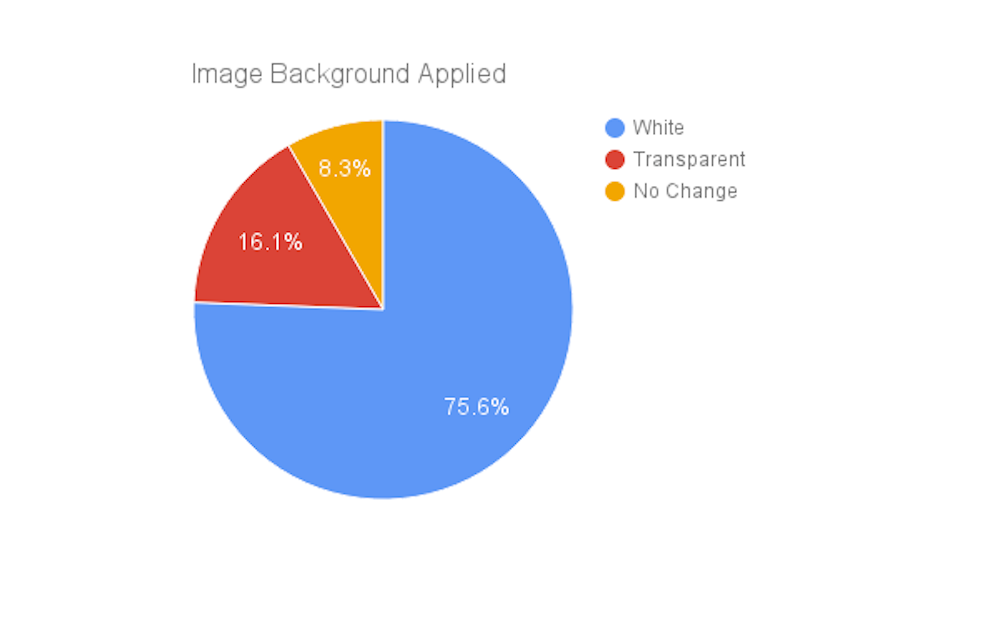
  • 76% are filled with a white background
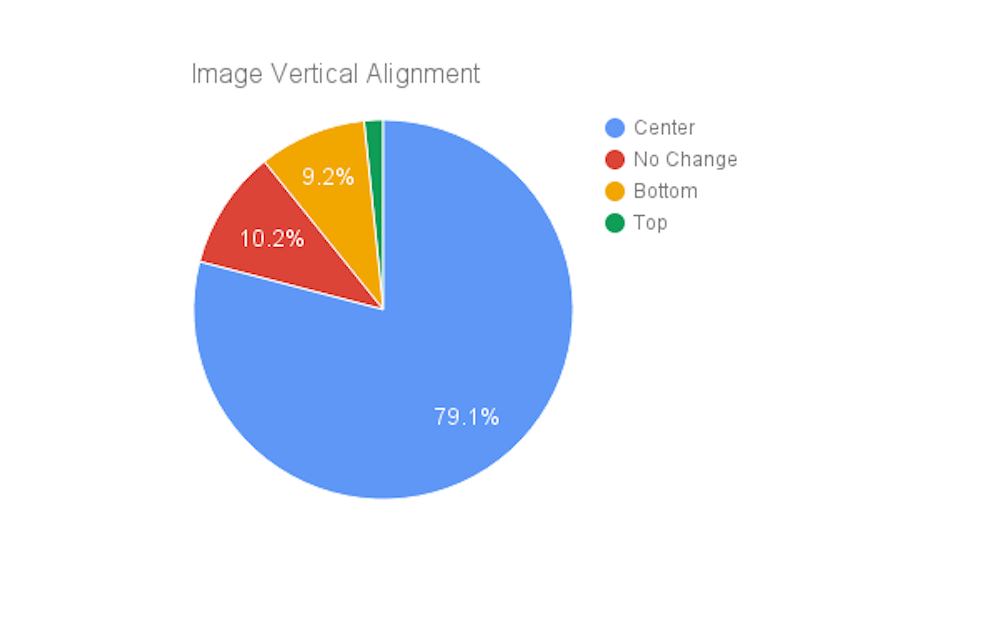
  • 79% are center vertically aligned
  • 1000px is the most common width
  • 750px is the most common height
  • 25px for each side is the most common margin

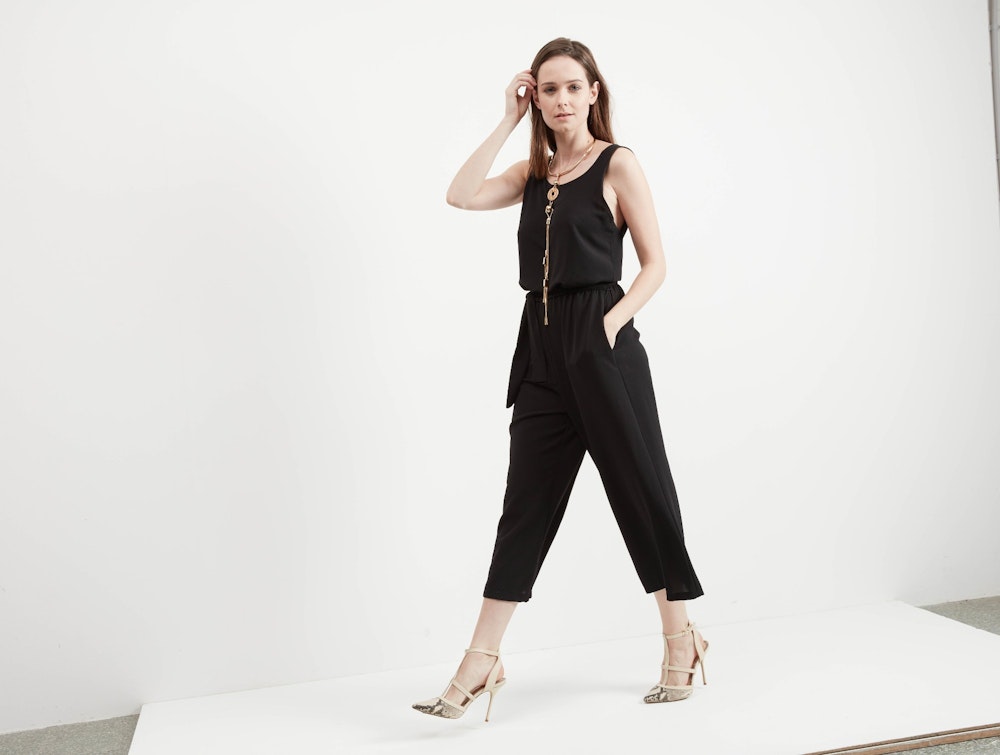
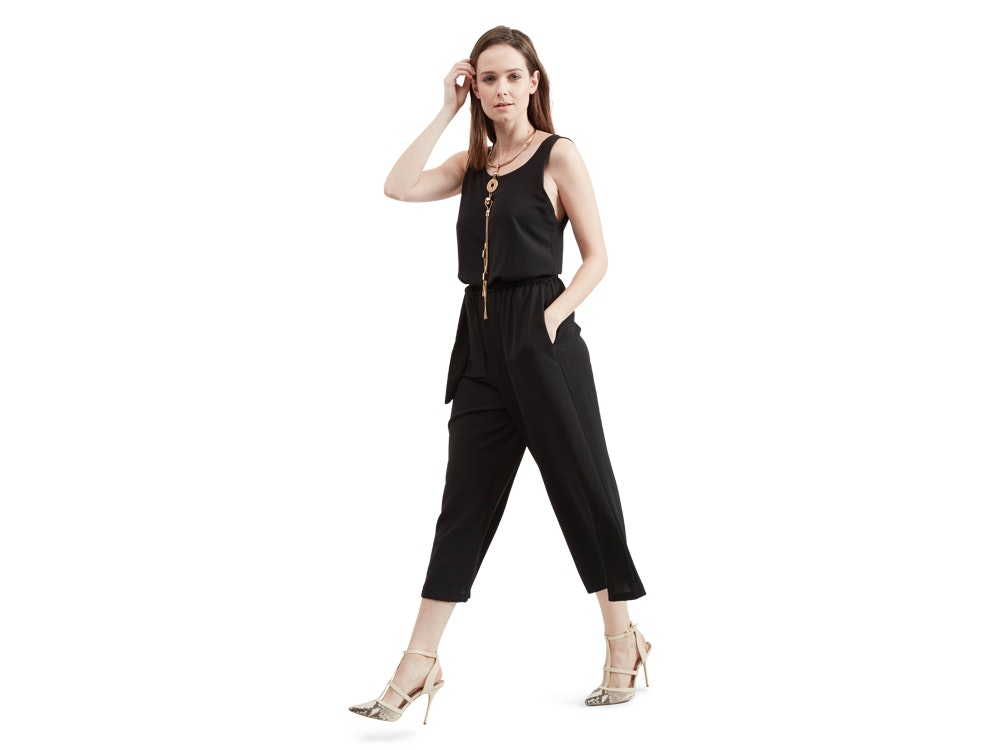
Want to see it in real life? Here’s an example using the most common specifications:

Model in black jumper walking in studio

Before post-production

Model in black jumper with background removed

After post-production by most common specs.

Not too dramatic, right? Nice and clean. It’s the type of image that makes browsing an eCommerce website a smooth experience.

Let’s start drilling down on the data, and we’ll see if we can find out both what’s happening and why.

Universal Image Properties

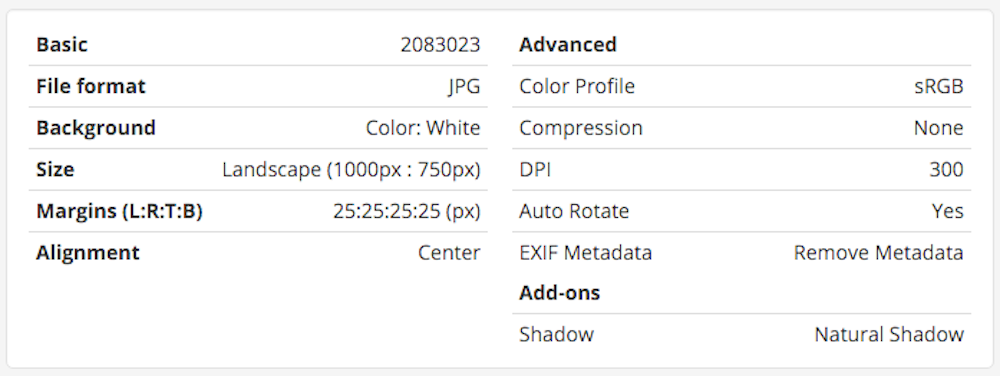
You can get fancy and add on features to set your images apart from your competitor, but all images share some properties. Here are the most common values we found, laid out in a Pixelz order specs card

Pixelz product image order specifications using the most common values

Product image order specifications using the most common values.

Let’s walk through each property and look deeper.

File Type: All Hail King JPG

First off, every image has a file type. At Pixelz, you can choose from JPG, PNG, TIFF, and PSD. JPG absolutely dominates, as you might expect:

pie chart showing most common product image file types: jpg, png, tiff, psd

JPG is far and away the most common product image file type.

Why does JPG rule the web?

Page load speed matters more than perfect compression.

JPG uses lossy compression that maintains high (but not perfect) quality, while PNG uses lossless compression that stands up to any amount of zooming and allows transparency. JPG images are smaller (less bytes), however, which pretty much ends the debate. On the Internet, loading even a fraction of a second slower costs you sales.

Product images are usually JPG on the web, and that’s not going to change until bandwidth doesn’t matter or some new file type overturns the apple cart.

Going back to our chart, it’s safe to assume that when PSD and TIFF are selected the final images in use will be something else. Both formats allow layer masks and clipping paths to be returned from image editors to the owner, which is useful if you’re planning cross platform publication of your product images (like printed catalogs, web, email, etc.).

Don’t be afraid to be different! 7 million product images reveal industry norms, but your…

Background: White Wins Handily

Most image owners elect to have the original background cut out of their product images and replaced with pure white.

Pie chart showing most common product image backgrounds after post-production: white, transparent, no change.

76% of all product images have white backgrounds.

Why are most image backgrounds filled with white?

Consistency and accurate color representation are both served by white backgrounds.

There’s actually several things going on here:

  1. Removing the background from a product image eliminates distractions and keeps the focus on your product
  2. Solid color backgrounds reduce your file size, because they simplify compression.
  3. Most web pages are white, so a white background blends your product image with the page.
  4. Filling the background of your image with white, much like photographing products on a white backdrop, represents your product’s colors accurately.

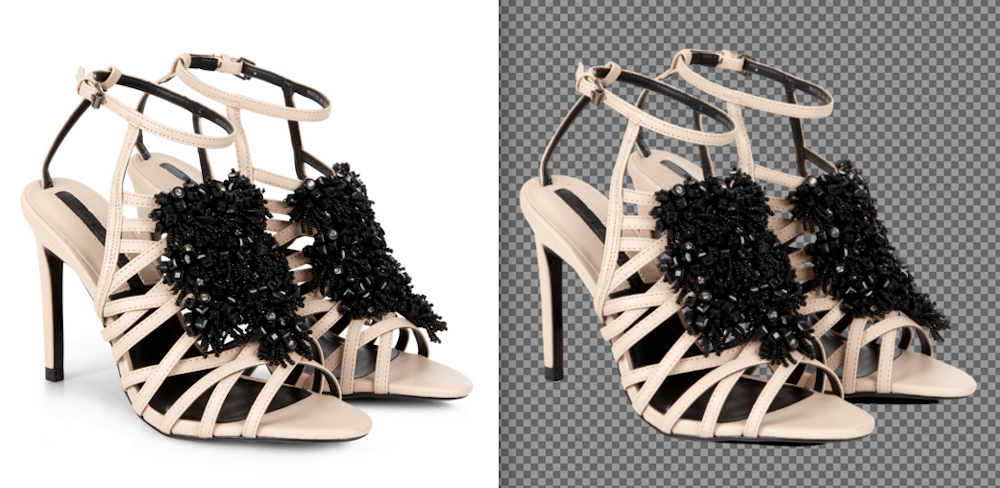
What’s a transparent background?

A cool but not fully supported feature.

Side by side comparison of jpg footwear product image with white background and png transparent background

PNG images can have transparent backgrounds, but it’s not supported everywhere.

Images with transparent backgrounds have the original background cut out and don’t replace it. Transparency can make it easier to overlay your product on different images, like in a montage, or on webpages with different colored backgrounds.

However, transparency isn’t supported by JPG, and you can run into display issues with transparent PNGs. If an application or CMS doesn’t support transparency for whatever reason, your pretty image turns ugly in a hurry.

Vertical Alignment: Find Your Center

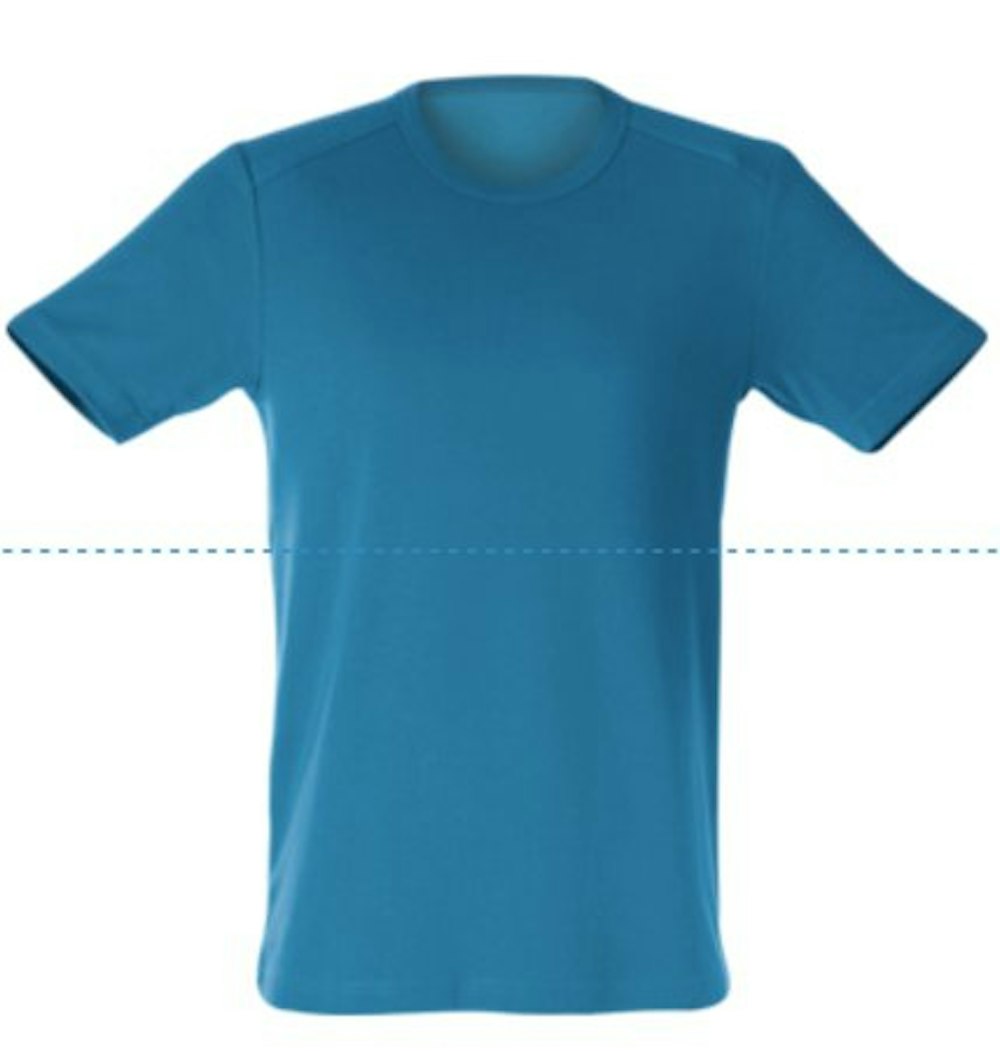
Images can be vertically aligned relative to their height by top, bottom, or center. We have another runaway winner: center vertical alignment.

Pie chart showing most common product image vertical alignment choices: center, no change, bottom, top

Center vertical alignment accounts for 79% of analyzed product images.

Why should I vertically center my product images?

It provides the most consistent presentation.

Vertical center alignment creates clean lines when you have products that vary in size and shape, like jewelry, furniture, tools, or other diverse products.

A bottom alignment is effective if you have a category page with all one product type, like a page made entirely of similarly shaped handbags. You can preview different alignments when creating your Pixelz order specifications.

Center vertical alignment example product image blue shirt

Margin: Equality for All

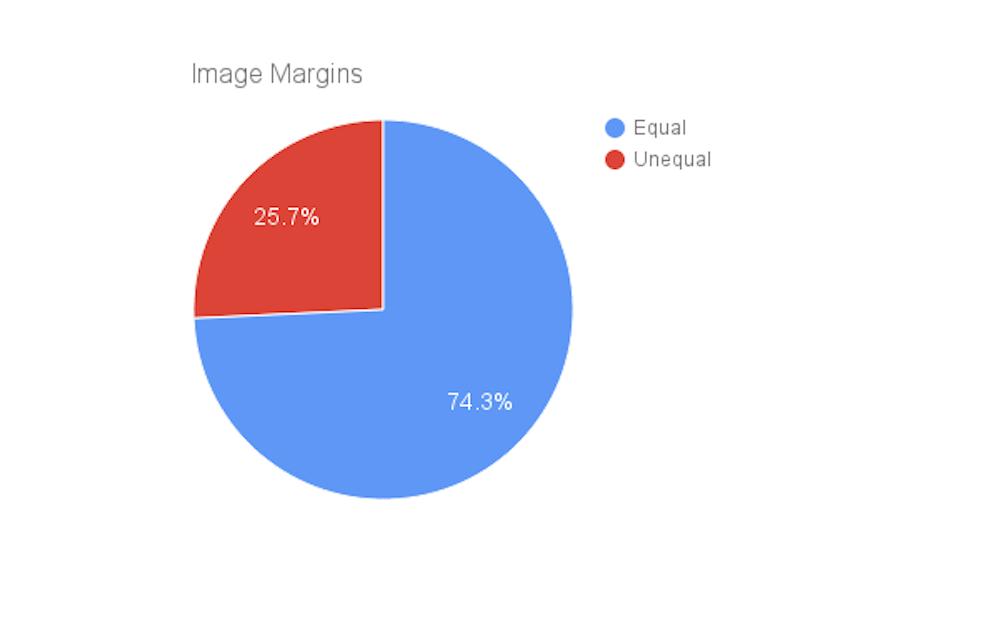
We allow customers to set margins in pixels, percent, or not at all. We have about an even split between exact pixels and percentage selection. There’s a pretty obvious trend when you drill down on exact pixel settings:

Pie chart comparing equal and unequal product image margins

Most product images have equal (within 1px) top, bottom, left, and right margins.

Why are equal margins so popular?

It provides failsafe spacing.

There’s no telling where your product images will end up and how they’ll be displayed. They might be viewed on your website, on a Pinterest board, on an influencer’s blog, displayed by a search engine, and pushed through a downstream retailer’s site.

Not everyone will be as careful and as tech savvy as you want them to be. If you add equal top, bottom, left, and right margins to your images, you can prevent a complete jumble from happening; the size of your margin matters less than being consistent.

5 years, 7 million edited product images, 1 infographic to rule them all!

Height and Width: No One Size Fits All

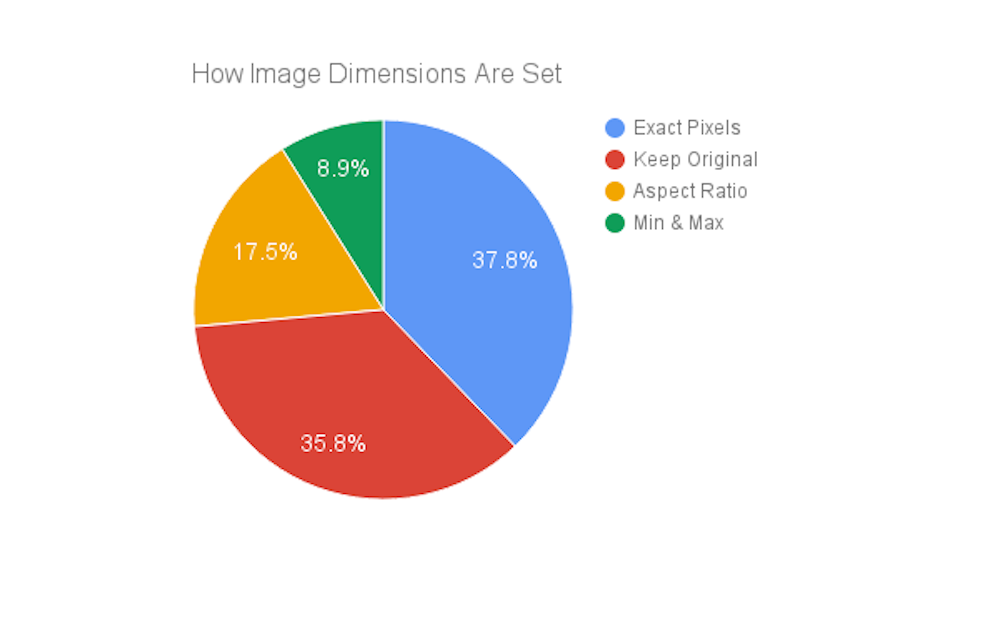
Examining our image dimensions data is interesting but tricky. You can set an exact pixel size, keep your original size, provide an aspect ratio, or provide minimum and maximum sizes. That means our data is all over the map.

Pie chart showing how product image dimensions are set: exact pixels, keep original, aspect ration, min & max

There’s wide variety in the methods used to set product image dimensions.

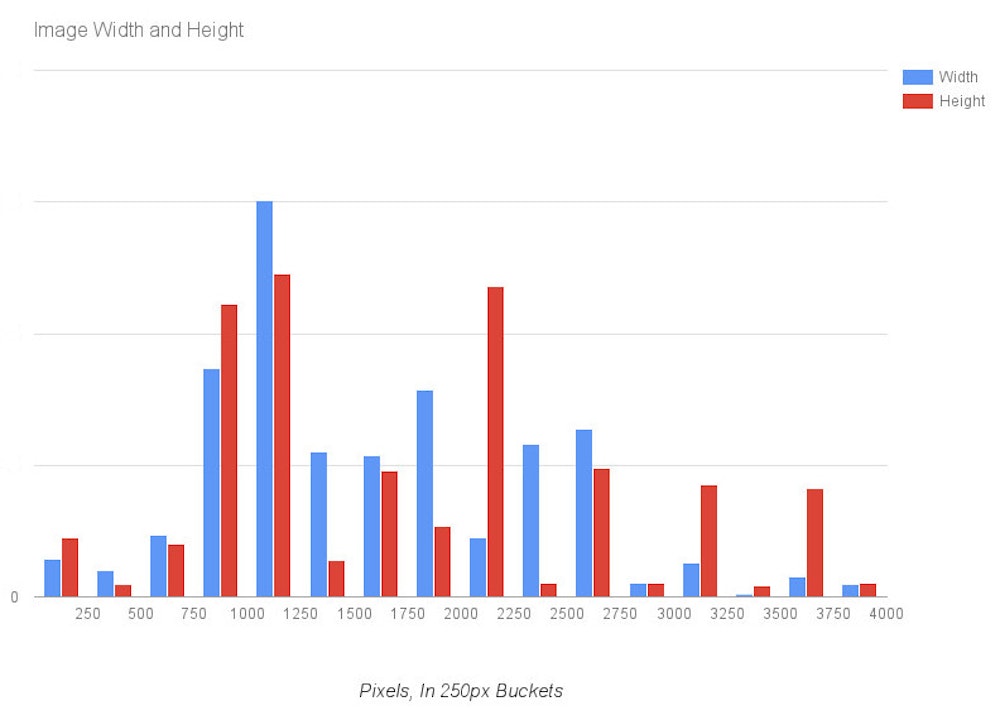
Let’s look closer at exact pixel size selections, which account for about 38% of the data set:

Histogram comparing image widths and heights for product images, in 250px buckets

Product images have greatly varying widths and heights.

What dimensions should I use?

There’s no objective answer. Height and width should be determined by your product and your web strategy.

Ecommerce platforms have different needs, as seen in this cheat sheet, and so do you. Speak with your web developer and find out what they think is optimal for your site. When in doubt, keep your original image dimensions. You can always scale an image down, but scaling it up compromises quality.

Featured Add-Ons

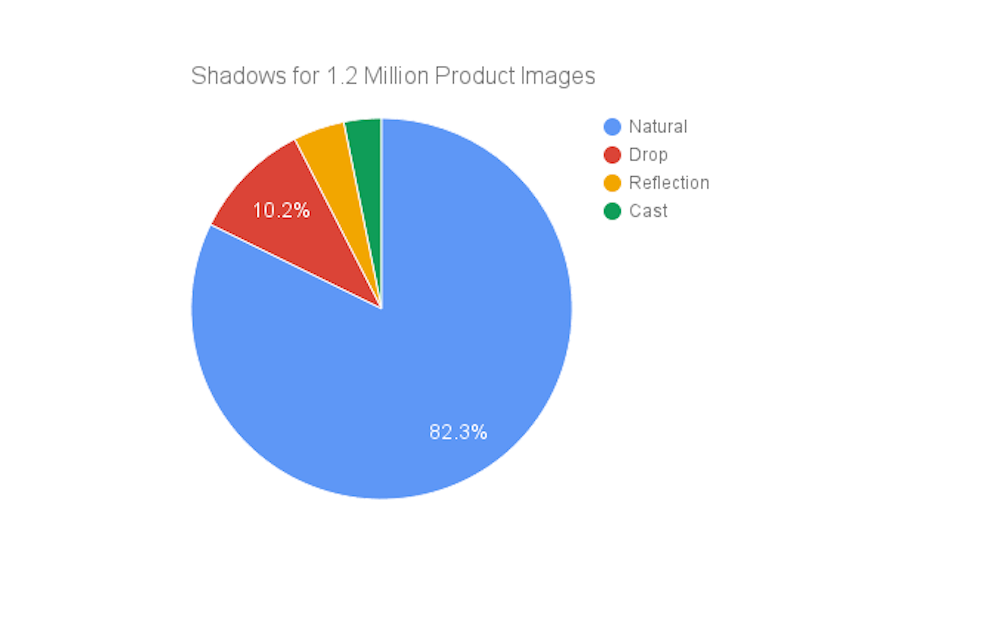
Nothing like a good shadow to give depth to your product image, right? The owners of 1.2 million product images agree with you.

Still with us? Awesome, you must love product images as much as we do! Let’s get into detail on even more features you can add-on with Pixelz>, like shadows, DPI, and color profile.

Shadows: Just Act Natural

Nothing like a good shadow to give depth to your product image, right? The owners of 1.2 million product images agree with you.

Pie chart showing shadow selections for 1.2 million product images: natural, drop, reflection, and cast

Natural shadow is the most popular shadow for product images.

Wait, how can you “add-on” natural shadow?

When we remove the background we leave the shadow, then retouch it as needed. We can create it in Photoshop if there’s no original shadow, as may be the case with professional studio lighting.

If you’re interested in something other than natural shadow, drop shadow and reflection shadow can be effective subtle elevations of your image quality.

Wait, how can you “add-on” natural shadow?

When we remove the background we leave the shadow, then retouch it as needed. We can create it in Photoshop if there’s no original shadow.

If you’re interested in something other than natural shadow, drop shadow and reflection shadow can be effective subtle elevations of your image quality.

DPI: Print Quality Is Trending Higher

About 2.4 million product images we processed had DPI settings.

Pie chart showing most common DPI settings for product images, led by 300 DPI and 72 DPI

300 and 72 DPI are the most common product image settings.

Does DPI matter for my images on the web?

No, absolutely not.

DPI (dots per inch) matters when printing, like for a catalog: the higher the number, the sharper the detail when printed. It does not actually affect the resolution of your digital image; it’s simply a string in the header of the file that communicates with printing software.

Every number on the Y axis of our chart had over 1000 images processed, but it’s clear that 300 DPI and 72 DPI are by far the most popular. 300 DPI is a high quality resolution for printing. 72 DPI is probably leftover from the myth of DPI, and the belief that 72 DPI is good for the web. In reality, DPI has no effect on your images when on the web.

Color Profile: sRBG is the Color Space to Be

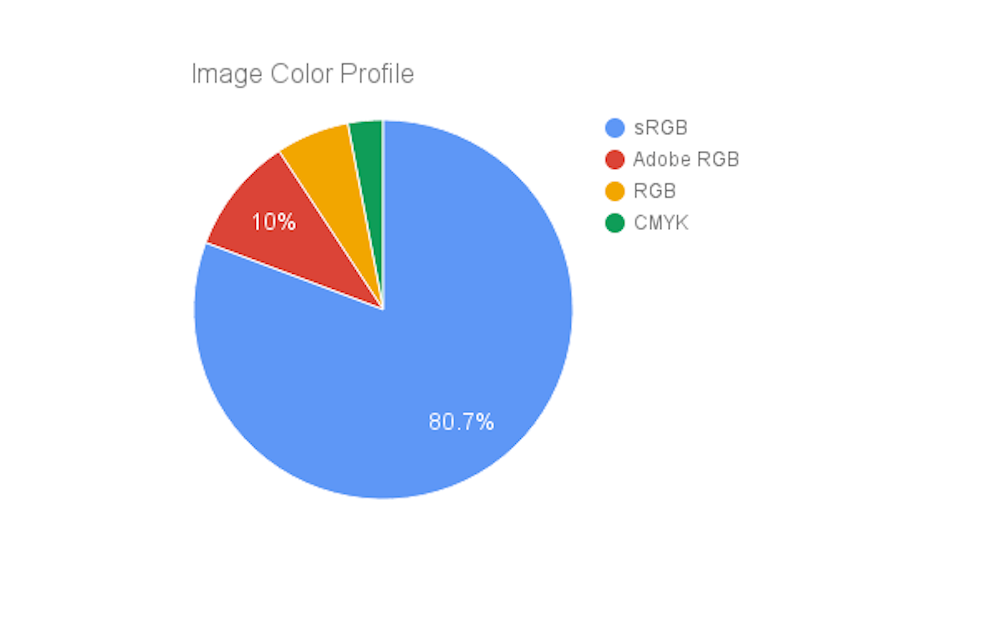
We haven’t always offered color profile options, and most image owners elect to keep their original color profile. Among the roughly 620,000 images that did set a color profile, there are four selections worth comparison: sRGB, Adobe RGB, RGB, and CMYK.

Pie chart showing most common color profile of product images: sRGB, Adobe RG, RGB, and CMYK

sRGB is the most popular color profile for product images.

Man, all these acronyms look alike.

We know. Don’t worry about it. Just use sRGB.

Once again we have a clear winner of the popular vote, with sRGB lapping the field several times. You can find a breakdown of its advantages in the Zen of sRGB Color Space. In simplest terms, the web is optimized for the sRGB color space, so it’s the best way to ensure accurate representation of your products.

What We’ve Learned

Optimize, optimize, optimize. While we wouldn’t necessarily recommend copying all the most popular settings for your own product images, you should certainly consider their value. Analyzing seven million images has made common industry practices clear.

You should probably be vertically center aligning your products, whiting out your background, using equal margins, and using JPG images for the web. Natural shadows are the most popular type of shadow, and sRGB is the best color profile for the web. If you’re printing, use 300 DPI.

All of that said: don’t be afraid to be different! Your product images should be optimized for your website. Being on the web means eCommerce owners share many of the same challenges, but products are unique and your needs may be different than the norm.

What is circular fashion?

This article was originally written for Make it last (June 1, 2015).

This article was originally written for Make it last (June 1, 2015).

Make it last: Circular fashion is quite a new concept in the context of sustainable fashion. How would you describe a “circular fashion consumer”?

Anna Brismar: To give you a brief background, the concept ‘circular fashion’ was first used publicly in June 2014 by two persons independently of each other. One of these persons was Felix Ockborn, at the time environmental sustainability coordinator for H&M in Stockholm. Felix used the term ‘circular fashion’ in its Swedish form, in his presentation Cirkulärt mode i globala värdekedjor at a seminar during Almedalsveckan on July 2, 2014. Just a week earlier, on June 24, I used the term ‘circular fashion’ for the first time at a project meeting when planning for the new fashion event CIRCULAR FASHION – SHOW & TALK 2014. Apparently, the time was right for the ideas of sustainable fashion and circular economy to merge. Although Felix Ockborn was probably first to coin and use the concept (perhaps already in May 2014?), no public material has so far been presented by H&M that specifically defines the concept ‘circular fashion’. (In the wake of such a definition, I have written a number of articles to explore the concept and circular approaches for the fashion industry.)

So, what does ‘circular fashion‘ actually mean? If fashion refers to a piece of garment, an accessory, or a pair of shoes, circular fashion can be defined as any fashion item that is:

  1. Designed so that its sub-components can be disassembled or separated to facilitate repair, remake, reuse and eventually material recycling at its end of use;
  2. Designed with high quality materials and in timeless style to maximize its durability, longevity and attractiveness to many users (if passed on to new users);
  3. Designed on demand (custom-made) in order to be more optimally designed for its specific user in terms of fabric/material, style and fit, thus increasing its perceived value and likely lifespan;
  4. Produced with non-toxic, high quality and preferably biodegradable materials, so that its material(s) may be safely biodegraded and composted at the end of use; or produced with non-toxic synthetic materials that may be effectively recycled (such as recyclable polyester);
  5. Produced in such a way that all waste generation is minimized during production, and all potential spill material and rest products can be reclaimed and reused as raw material for other processes, thus minimizing the extraction of new virgin material;
  6. Produced, transported and marketed using renewable energy, such as wind or solar power, wherever possible, and using water and other raw materials effectively and safely throughout production and distribution;
  7. Can be used by multiple users throughout its life time through swapping, borrowing, rental, redesign, or second hand services, thus extending its user life; and
  8. Can be safely and effectively reclaimed and recycled, whereby its components are utilized as raw material for manufacturing of new products, or are biodegraded and turned into biological nutrients for microorganisms in the soil.

But what does a ‘circular fashion consumer‘ stand for? Based on the above principles, a circular fashion consumer is any person who aspires to:

  • Buy items that he/she genuinely appreciates and intends to keep and use actively for a long time, possibly a lifetime;
  • Buy items of high quality with regards to both the materials involved (for example the fabric) and the overall product, so as to have it look good, work well and last for a long time;
  • Buy items that are non-toxic and/or organic, that is products that contain no harmful substances and have been produced without any toxic substances or materials involved. The customer here often seeks products that have been certified according to an eco-label, such as GOTS, EU Ecolabel or the Nordic Ecolabel (Svanen);
  • Buy items that are made with organic or recycled materials, preferably environmentally certified. The customer prefers natural materials (such as wool, linen, silk, and viscose) before synthetic (such as polyester, acrylic and nylon), and also recycled material before virgin. Ethical and fair trade products are also generally sought;
  • Buy items that can be easily repaired and redesigned in order to make maximum use of the product and the materials involved;
  • Buy items that can be easily and safely disassembled in order to facilitate effective reuse and recycling of its sub-components and materials at their end of use (T-shirts with plastic prints are thus not a good option!);
  • Prioritize looking for second hand or vintage pieces, or finding fashion pieces through renting, borrowing or swapping as opposed to buying newly produced goods;
  • Take good care of his/her wardrobe through careful washing practices (low temperatures, gentle eco-detergents, no tumble drying, and/or hand wash) and, when possible, avoiding washing all together by airing clothes outdoor or similar;
  • Hand in items that are no longer needed or appreciated to secondhand shops or charity organizations, or pass them on to friends or relatives, in order to give them new life; and
  • Take worn-out or unmendable products to a recycling station so that they can be recycled and reused as raw material or components in new products.

To summarize, a ‘circular fashion consumer’ is a person who appreciates the true value of a garment, a pair of shoes, or accessory, including all work that lies behind and all precious natural resources that have been used throughout its supply chain. He/she aims to hold on to its belongings for as long as possible, and to use them a maximum number of times during their lifetime. In all, he/she wishes to contribute to a fashion industry that is ‘circular as opposed to linear’, in which nothing goes to waste and everything is utilized, reutilized, repurposed and recycled in the most effective and sustainable manner possible.

(The photo above: Emma Elwin, co-founder of Make it last, talks about her view on sustainable fashion at Filippa K, a Swedish brand working actively towards a more circular fashion industry.)

This article was originally written and published for Make it last on June 1 (2015). Republished here with permission.

White Backgrounds Be Gone: How Zara, Revolve and Free People Add Color and Creativity to Product Photography

We’ve edited nearly 10 million product images at Pixelz, and the statistics are pretty clear: Ecommerce site owners love white backgrounds.

pixelz-product-photography-data-7M-images
Out of seven million edited product images, about 92% removed the background. Via Pixelz product image report.

We analyzed seven million images, and found that 76% had their original background replaced with pure white. An additional 16% removed the background and opted for transparency, while the bulk of the rest simply stuck with their original background (usually white).

There are plenty of great reasons to shoot on a white background and remove it in post-production. It’s consistent, clean, colors are true and file size is minimized.

It’s also boring.

Calm down: we love white backgrounds, too. We preach the advantages of removing the background all the time; we even used to be named “Remove the Background.”

That said, there’s a big difference between category pages and product pages, and there’s room for creativity in ecommerce. One size does not fit all.

For reference, check out how Solange designed her home page product features for the new Saint Heron store. Traditional best practices say to keep everything in a grid, each product mimicking the size of the one before it. To that, Solange said, “No.”

saint heron gif

If you’re itching to try something new, or looking for creative ways to brand your category pages and product images, here are five alternative approaches successful companies are using today.

1. Solid Color Backgrounds – Zara

pixelz-product-photography-color-background-zara-black-dress
Zara sometimes uses dramatic solid colored backgrounds, particularly when the product itself is solid black or white.

Zara likes to mix in solid colored backgrounds on their category pages, alongside traditional white and neutral backgrounds.

Most sellers are worried, quite rightly, about creating color confusion for the customer. Zara avoids that problem by using colored backgrounds mostly with solid black or white products.

pixelz-product-photography-whitevscolor-background-zara
Zara stays neutral for subtle color variations, then goes dramatic again for a solid white product.

When a product has subtle patterns or color variations, they use a more traditional white or gray background.

pixelz-product-photography-colorful-print-on-background
Colorfully patterned products need a neutral background for accurate perception.

You can be certain that all the product images with a colored background were shot against a white or gray backdrop, and then colored in post-production. In fact, all Zara’s product pages (as opposed to colorful category pages) feature product images on a neutral background.

Ensure accurate white balance during photography by using a gray card and adjusting your camera settings.

2. Themed Backgrounds – Revolve

pixelz-product-photography-revolve-textured-background
Revolve uses consistent backgrounds in themed collections. “Desert Oasis” features a textured wall.

Revolve has mastered a “shop the look” strategy. Throughout their website, they have themed collections from lookbook shoots. Within a collection, images are consistent, like in the textured wall examples above and below from their “Desert Oasis” collection.

pixelz-product-photography-white-background-product-listing
When shopped, more traditional product images with background removed are presented.

Actually clicking on an image to shop it brings up a more traditional product image without a background. Customers can quickly click through different angles and see the product perfectly lit in a studio setting.

pixelz-product-photography-revolve-listing
Revolve’s textured wall backdrop serves as a prop, with models leaning against it.

Note how the wall is more than just a background. It’s also used as a prop, allowing the model to lean against it. Such poses convey attitude, and shadows cast on the wall create depth and shape.

3. On-Location Images – Free People

pixelz-product-photography-free-people-listing
Free People uses lookbook images taken on-location on their category pages.

Free People uses on-location lookbook images on their “Dresses” category page to create a complete vision for their brand. Shots are on-location with models in motion, interacting, styled and propped. Taken together, the images tell a story.

pixelz-product-photography-side-images-free-people

On the product page, alternative images have more traditional backgrounds.

Shooting on-location is considerably more expensive and slower than studio photography. Even a brand like Free People, selling dresses at a $700 price point, doesn’t use on-location images everywhere.

As you can see on the left, the alternate shots of a dress on the product page are more traditional studio images.

How much might it cost you to shoot a lookbook?

Well, to start with, probably several thousand dollars a day for just a photographer and model. If it’s a destination shoot, you’ll need to pay for airfare, accommodations, on-site travel and food for your entire crew. Costs can get pretty steep in a hurry.

The best advice I can give here is to tell you to find the right photographer. Don’t get too cheap out there, or the rest of your time and money will be wasted. If you have to cut corners to save your budget, do it somewhere else –– like shooting locally instead of traveling.

You’ll be able to use your lookbook images a variety of places. Throughout your website, in emails, on Instagram and other social networks, in a brick-and-mortar store if you have one, in catalogs –– everywhere, really.

A lookbook will cost you, but it’s worth it.

4. Instagram – Planet Blue

pixelz-product-photography-instagram-example
Planet Blue uses their Instagram feeds (primary and different locations) like a category page on their homepage.

Planet Blue uses their own Instagram feed to create a social category page. Casual laydowns and handheld shots are mixed in with more professional shots to create a shopping experience that’s familiar to any social network user.

pixelz-product-photography-planet-blue-instagram-image
Clicking on an image allows you to navigate to the product page for any product.

The less formal nature of Instagram, and the way each image is expected to be self-contained, allows for a huge variety of settings. The images aren’t expected to be visually consistent, so long as they stay on brand.

There’s the added benefit of gaining followers to your Instagram feed. In the case of Planet Blue, they have multiple brick-and-mortar locations that have their own Instagram accounts. Those stores can contribute to the main website’s “Shop the ‘Gram,” and increase their exposure.

Like all of our other examples, once you get to the actual product page you get a neutral background. In this case, it’s a transparent image and the whole page has a gray background.

pixelz-product-photography-planet-blue-product-listing
Planet Blue uses transparent images on a neutral color for product pages.

5. Product Frames – Dior

pixelz-product-photography-dior-product-listing
Dior uses a box frame to help customers reference bag size on category pages.

Dior shows you how small changes can have a big effect. When displaying handbags, Dior doesn’t abandon the white background completely, but they use a box to frame their product instead of having it float in space.

It’s subtle, attractive, and has the added benefit of creating scale. The walls of the box provide reference points to help you judge the width and height of different bag sizes.

Size is a challenge most online retailers face: here’s a guide to representing size in product images more indirectly than Dior does. You can create the impression of size in post-production, if your product isn’t suited for Dior-style staging.

Neutral Backgrounds Still Rule Product Pages

As you probably noticed, most of these approaches are for category pages and their equivalents. Once you get to an actual product page, product images have white, transparent, or neutral backgrounds.

pixelz-product-photography-zara-black-dress-grey-background
Even colorful Zara uses neutral backgrounds on their product pages.

Removing the background makes your images more consistent, removes distractions, and minimizes file size. Many marketplaces require white or neutral backgrounds for product images, and if you’re a brand, it’s easy to pass such images to downstream retailers.

If you’d rather spend your time and money on creative photography in order to brand yourself, consider outsourcing your product image editing. The ability to scale up or down with seasonal needs, pay per image, and get processed images back in under 24 hours will simplify your workflow.

What do you think about these examples? Have you seen other interesting category pages or product pages? Tweet us and let us know in the comment section!